Email Bounce Rate: What’s Normal and How to Lower It
A rising bounce rate is the earliest warning that your contact data is going stale. Here is how to calculate it, what counts as healthy and the practical steps that bring it down.
 Farrukh R.Founder, Dataverix · 4 min read

KEY TAKEAWAYS
- Email bounce rate = bounced emails ÷ emails sent × 100.
- A widely used rule of thumb is to keep bounces below 2%. Anything well above that is a sign your list needs attention.
- Hard bounces (address doesn’t exist) should be removed immediately. Soft bounces (full mailbox, temporary error) can be retried a limited number of times.
- The most effective fix is upstream: verify addresses before you send and re-verify lists that are more than a few months old.
What is an email bounce rate?
Email bounce rate is the percentage of sent emails that could not be delivered and were returned by the receiving mail server. It is one of the clearest signals mailbox providers use to judge whether a sender is careful with their list.
How to calculate your bounce rate
The formula is simple:
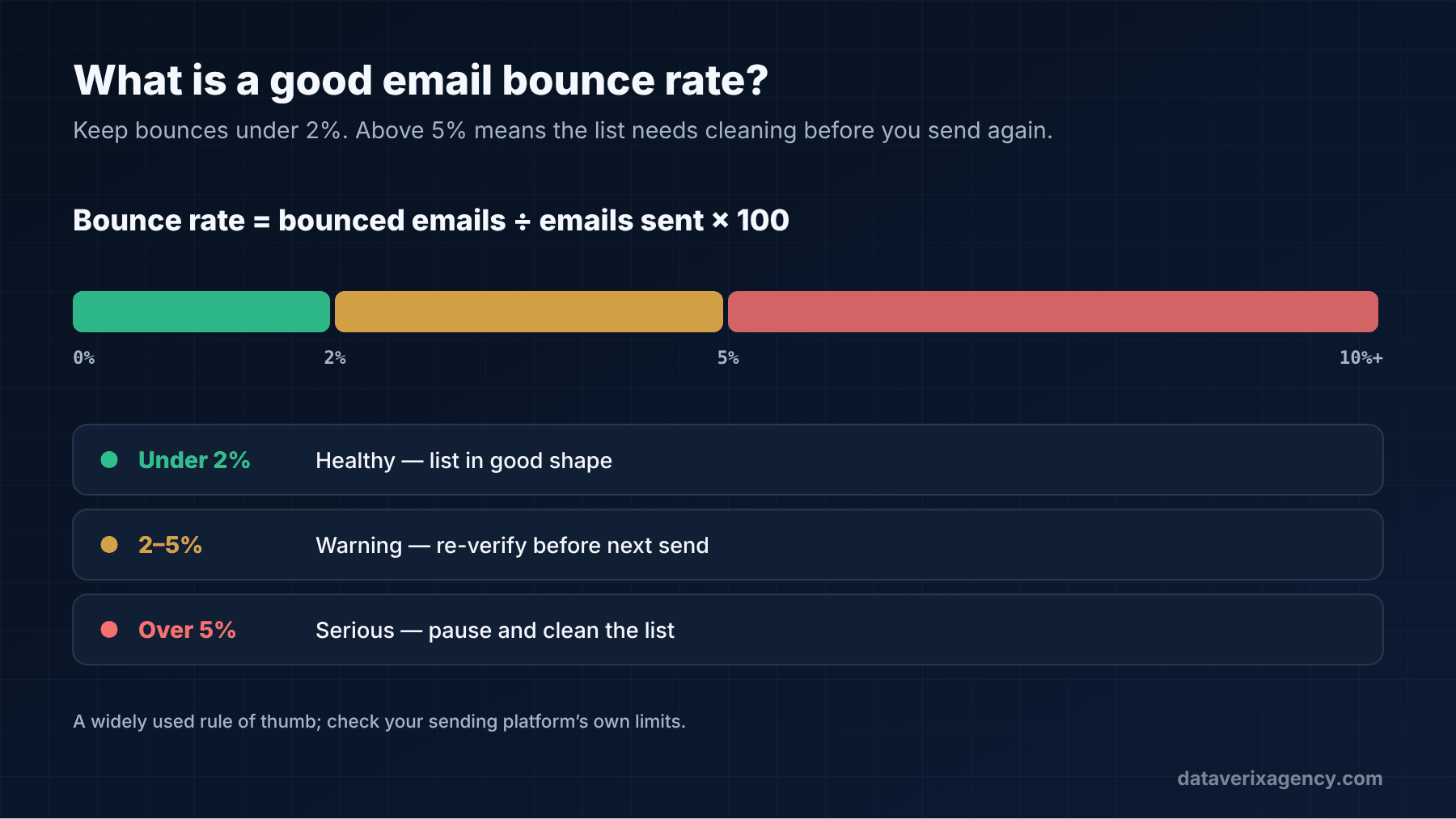
Bounce rate = (number of bounced emails ÷ number of emails sent) × 100
For example, if you send 1,000 emails and 25 bounce, your bounce rate is 2.5%.
Most email and outreach platforms show this figure for each campaign. Look at it per campaign and per list source, so you can see where bad data is coming from.
What is a good email bounce rate?
There’s no single official number, but a widely used rule of thumb across email platforms is:
| Bounce rate | What it usually means |
|---|---|
| Under 2% | Healthy. Your list is in good shape. |
| 2–5% | Warning. Review the source and re-verify before the next send. |
| Over 5% | Serious. Pause, clean the list and check where the data came from. |
Cold outreach to purchased or scraped lists tends to bounce more than email to opted-in subscribers, which is exactly why B2B prospect lists need verification before use. Some sending platforms also pause accounts whose bounce rates run high, so check your provider’s own limits.
Hard bounces vs soft bounces
Hard bounces
A hard bounce is a permanent failure. The address doesn’t exist, the domain is invalid or the server has blocked delivery. Common causes in B2B: the person left the company, the company changed its domain, or the address was guessed incorrectly. Remove hard-bounced addresses immediately and never send to them again.
Soft bounces
A soft bounce is a temporary failure: a full mailbox, a server that is temporarily unavailable or a message that is too large. Most platforms retry automatically. If an address soft-bounces repeatedly across several campaigns, treat it like a hard bounce.
Why bounce rate matters so much
Mailbox providers such as Gmail and Outlook watch how senders behave. A high bounce rate suggests a sender isn’t maintaining their list, and that can push your future emails toward the spam folder — including emails to your existing customers. In 2024, Google and Yahoo tightened the rules for bulk senders, requiring authentication and low spam-complaint rates. Clean data is now part of basic deliverability.
How to reduce your email bounce rate: 8 steps
- Verify every address before you send. Run syntax, domain and mailbox checks. This is the single biggest lever. See our email verification service.
- Re-verify old lists. If a list is more than a few months old, check it again before a campaign.
- Handle catch-all addresses separately. They can’t be fully confirmed. Read what is a catch-all email for how to treat them.
- Remove hard bounces immediately — in your outreach tool and your CRM.
- Don’t guess email formats. Confirm the company’s pattern from a published address first. Our guide on how to find a business email address shows how.
- Set up authentication. Make sure SPF, DKIM and DMARC are correctly configured for your sending domain.
- Warm up new domains and mailboxes gradually instead of sending large volumes on day one.
- Clean your CRM regularly. Old, duplicated and unverified records creep back into campaigns. A periodic CRM data cleanse stops that.
The real cause is usually the data source
When bounce rates climb, teams often blame the email tool or the copy. More often, the problem is the list underneath. A cheap database with stale records will bounce no matter how good your settings are. We cover this in more depth in the real cost of a cheap B2B database.
Related: Email list hygiene: how to avoid Gmail and Outlook rejections — a five-step routine to keep bounces and complaints low as inbox providers tighten enforcement.
Frequently asked questions
What is an acceptable bounce rate for cold email?
Aim to stay below 2%. Cold email lists are more prone to bounces than opt-in lists, so verification before sending is essential to stay in that range.
What causes a high email bounce rate?
Usually outdated or unverified contact data: people who changed jobs, companies that changed domains and guessed email addresses. Missing email authentication and sending too much from a new domain can also contribute.
Does a high bounce rate affect deliverability?
Yes. Mailbox providers treat frequent bounces as a sign of poor list hygiene, which can push your emails into spam folders and, in some cases, lead your sending platform to restrict your account.
Should I remove soft-bounced emails?
Not after a single soft bounce. But if an address keeps soft-bouncing across several campaigns, remove it or re-verify it.
Start with clean data
The easiest bounce to fix is the one you never send. Request a free data sample and see what verified, clearly labelled contact data looks like.
Cover photo: Lukas Blazek on Unsplash.
Founder of Dataverix. Farrukh specializes in B2B lead generation, decision-maker research and contact data enrichment, helping US businesses turn fragmented information into structured, sales-ready prospect data.
Meet the founder Upwork profile ↗farrukh@dataverixagency.com