Email List Hygiene: How to Avoid Gmail and Outlook Rejections
Email list hygiene now decides whether Gmail and Outlook accept your B2B emails. Here is a five-step routine to clean your list before you send.
 Farrukh R.Founder, Dataverix · 6 min read

KEY TAKEAWAYS
- Email list hygiene is the routine of removing invalid, duplicate, unsubscribed and risky addresses from a list before you send, so mailbox providers keep accepting your mail.
- Gmail has been rejecting more non-compliant mail since November 2025, and Outlook.com rejects high-volume mail that fails authentication with a “550 5.7.515” error.
- For B2B teams, clean lists matter twice: they protect your sending domain and they keep you on the right side of CAN-SPAM, which has no exception for business-to-business email.
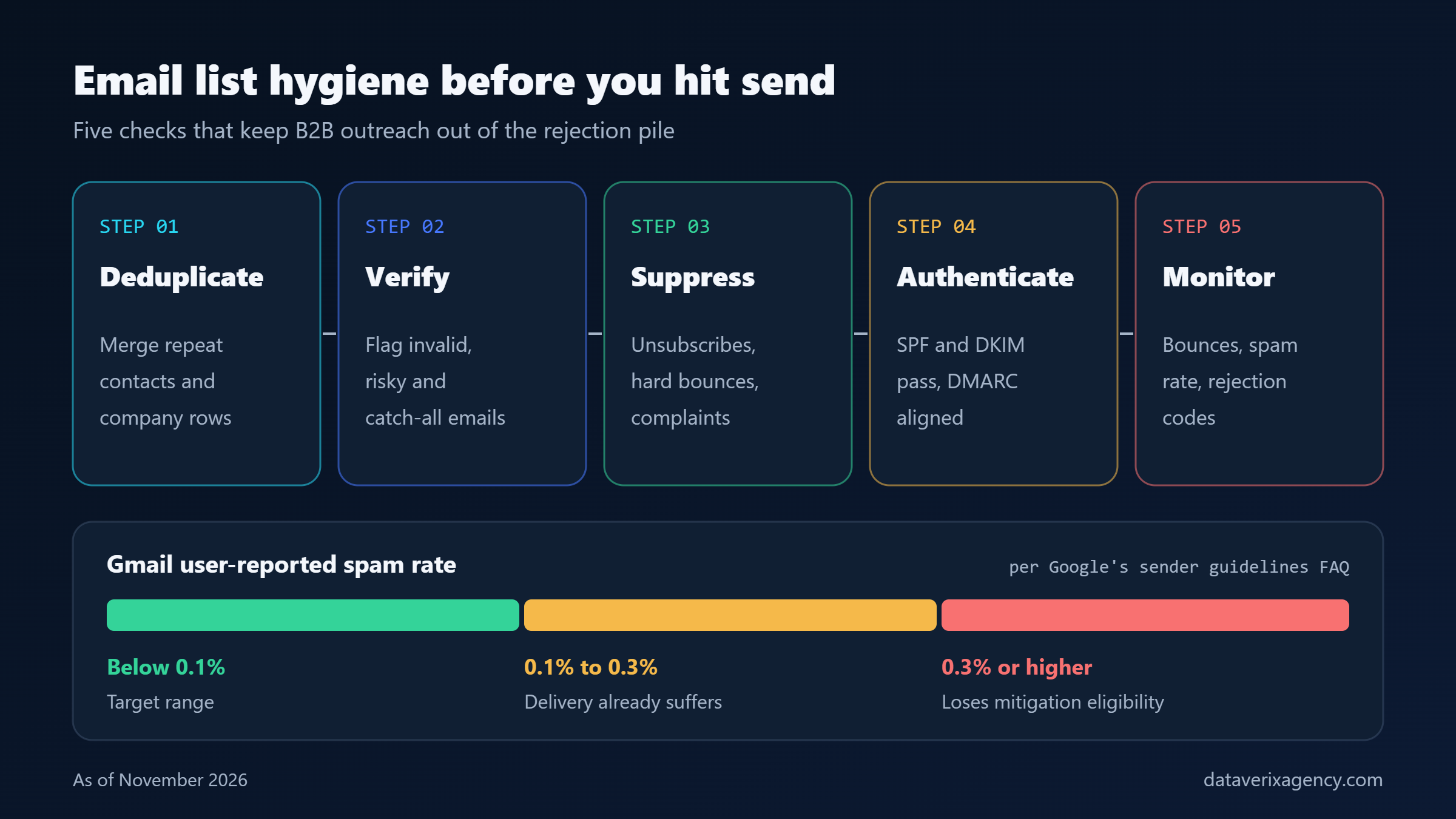
- A practical routine is five steps: deduplicate, verify, suppress, authenticate and monitor — before every campaign and on a monthly or quarterly schedule.
Email list hygiene is the fastest, cheapest way to stop B2B emails from being rejected outright by Gmail and Outlook. If your list is full of dead addresses, duplicates and people who already opted out, mailbox providers now push back with hard rejections rather than quietly filing your message in spam.
On November 4, 2026, a LearnWoo deliverability report ahead of Black Friday warned that Gmail and Outlook “now reject, not just junk” non-compliant mail during the busiest sending weeks of the year. The same pressure hits B2B sales teams running year-end outreach. Below, we explain what changed, what the thresholds are, and a simple routine any US small business can follow.
What is email list hygiene and why does it matter now?
Email list hygiene is the ongoing practice of keeping a mailing list accurate: removing addresses that bounce, merging duplicates, honoring unsubscribes and flagging risky contacts before a send. It matters more now because the largest inbox providers have moved from warnings to enforcement.
Google’s Email sender guidelines FAQ states that starting November 2025, Gmail is “ramping up its enforcement on non-compliant traffic,” including temporary and permanent rejections. As Spam Resource reported on November 6, 2025, the requirements themselves did not change — the level of enforcement did. In practice, that means problems that once cost you a few opens can now stop a campaign from being delivered at all.
Who counts as a bulk sender?
Google defines a bulk sender as one that sends close to 5,000 or more messages to personal Gmail accounts in 24 hours, and that status does not expire. Microsoft uses a similar 5,000-per-day line for Outlook.com, Hotmail.com and Live.com addresses. Many small B2B teams sit below those numbers — but the hygiene habits that keep large senders compliant also protect smaller ones.
What do Gmail and Outlook require from senders?
Both providers require authenticated mail, easy unsubscribes and low complaint rates; they differ mainly in how they measure and enforce. Here is a side-by-side view, as of November 2026.
| Requirement | Gmail (personal accounts) | Outlook.com consumer domains |
|---|---|---|
| Bulk threshold | Close to 5,000+ messages in 24 hours | More than 5,000 emails per day |
| Authentication | SPF, DKIM, DMARC alignment, valid DNS, TLS | SPF and DKIM pass; DMARC policy of at least “none,” aligned |
| Spam / complaint rate | Keep below 0.1%; never reach 0.3% | Send only to consenting recipients; keep lists clean |
| Unsubscribe | One-click (RFC 8058) for marketing mail; honor within 48 hours | Easy-to-find, working unsubscribe link |
| What happens if you fail | Temporary (4.7.x) or permanent (5.7.x) rejections | Rejection with “550 5.7.515 Access denied” since May 5, 2025 |
The Outlook details come from Twilio SendGrid’s summary of Microsoft’s announcement, which also notes that Outlook’s FAQ recommends removing inactive or invalid addresses on a monthly or quarterly basis.
How does email list hygiene affect deliverability?
A clean list lowers bounces and spam complaints, the two signals that most quickly damage sender reputation. Each invalid address that bounces tells the receiving server you are not managing your data; each unwanted message that gets reported as spam pushes your complaint rate toward Google’s 0.3% danger line.
Google says that once a bulk sender’s user-reported spam rate reaches 0.3% or more, it loses eligibility for mitigation, and it only regains eligibility after seven consecutive days below that level. A week of reduced delivery in December can mean a week of missed meetings. Our guide to what a healthy email bounce rate looks like covers the bounce side of the equation in more depth.
How do you clean an email list before a B2B campaign?
Run five checks in order: deduplicate, verify, suppress, authenticate and monitor. This takes a few hours for most small-business lists and prevents most avoidable rejections.
1. Deduplicate
Merge repeated contacts and company rows, especially after importing lists from several tools. Duplicates double-send to the same person, which inflates complaints.
2. Verify every address
Run the list through an email verification step and sort results into valid, invalid, risky and catch-all. Remove invalid addresses; send risky and catch-all addresses in small, monitored batches or not at all. If you are unsure what catch-all means, read our explainer on catch-all email addresses. Our business email finding and verification service handles this step for teams without the tools in-house.
3. Apply suppressions
Remove anyone who unsubscribed, hard-bounced or complained, across every tool you send from. A suppression list that lives in only one platform is a common source of repeat complaints.
4. Confirm authentication
Check that SPF and DKIM pass and DMARC is aligned for the exact domain you send from — including any secondary domains used for outreach.
5. Monitor results
Watch bounce rates, spam complaints and rejection codes for every send. A sudden run of 5.7.x codes from Gmail or “550 5.7.515” from Outlook means stop, fix and re-verify before continuing.
How often should you clean your email list?
Clean your email list before every major campaign and on a fixed monthly or quarterly schedule, which matches Outlook’s own guidance. B2B contact data goes stale as people change jobs, companies rebrand and domains lapse, so a list that was clean in the spring can carry many dead addresses by the end of the year.
For larger databases, pair email checks with broader record maintenance. Our CRM data cleansing checklist walks through the full process, and our CRM data cleansing service can take the work off your plate.
Does CAN-SPAM apply to B2B cold email?
Yes. The FTC’s CAN-SPAM Act compliance guide for business states plainly that the law “makes no exception for business-to-business email.” This is general information, not legal advice.
Key obligations include accurate header and subject lines, a valid physical postal address, a clear way to opt out, and honoring opt-outs within 10 business days. The FTC guide lists penalties of up to $53,088 per violating email; check the FTC site for the current figure. Good list hygiene — especially shared suppression lists — is how small teams meet the opt-out rule in practice.
Frequently asked questions
What is email list hygiene?
Email list hygiene is the regular practice of keeping a mailing list accurate and safe to send to. It includes removing invalid and duplicate addresses, honoring unsubscribes and complaints, and flagging risky or catch-all contacts, so that bounces and spam reports stay low and inbox providers keep accepting your mail.
How often should I clean my B2B email list?
Clean it before every major campaign and on a monthly or quarterly schedule. Outlook’s guidance recommends removing inactive or invalid addresses on that cadence. B2B data changes as people switch jobs and companies change domains, so lists left untouched for months tend to collect dead addresses.
Can a dirty list get my emails rejected by Gmail?
It can contribute. Gmail has been applying temporary and permanent rejections to non-compliant traffic since November 2025. High bounce and spam complaint rates damage your reputation, and a user-reported spam rate of 0.3% or more removes a bulk sender’s eligibility for mitigation until it stays below that level for seven days.
Is a clean email list service worth it for a small business?
It is worth it when your team lacks verification tools or time, or when you are about to send to a large or older list. A service should deduplicate, verify and label each address and explain its limits. No provider can guarantee inbox placement, so treat cleaning as risk reduction, not a promise.
Get a verified list before your next campaign
Year-end outreach only works if your emails are accepted. If you want a cleaner starting point, Dataverix researches and verifies B2B contacts to your exact criteria and labels every email status so you know what is safe to send. Request a free data sample and see the difference a verified list makes.
Cover photo: Glenn Carstens-Peters on Unsplash.
Founder of Dataverix. Farrukh specializes in B2B lead generation, decision-maker research and contact data enrichment, helping US businesses turn fragmented information into structured, sales-ready prospect data.
Meet the founder Upwork profile ↗farrukh@dataverixagency.com