What Is a Catch-All Email? (And Should You Send to One?)
When a verifier marks an email "catch-all", it isn't saying the address is good or bad — it's saying it can't tell. Here is what that means and how to handle catch-all contacts safely.
 Farrukh R.Founder, Dataverix · 4 min read

KEY TAKEAWAYS
- A catch-all email (also called accept-all) is a domain whose mail server accepts messages sent to any address, whether or not that mailbox exists.
- Because the server says “yes” to everything, email verifiers can’t confirm whether a specific catch-all address is real.
- Catch-all addresses are not bad — many are perfectly real — but they carry more risk than verified ones.
- Keep them in a separate segment, confirm the email pattern from a published address and send to them in small, monitored batches.
What is a catch-all email?
A catch-all email address is any address at a domain whose mail server is set to accept all incoming messages, even those sent to mailboxes that don’t exist. Companies turn this on so they never miss an email sent to a misspelled name or an old address. The messages are typically delivered to a shared inbox — or simply discarded.
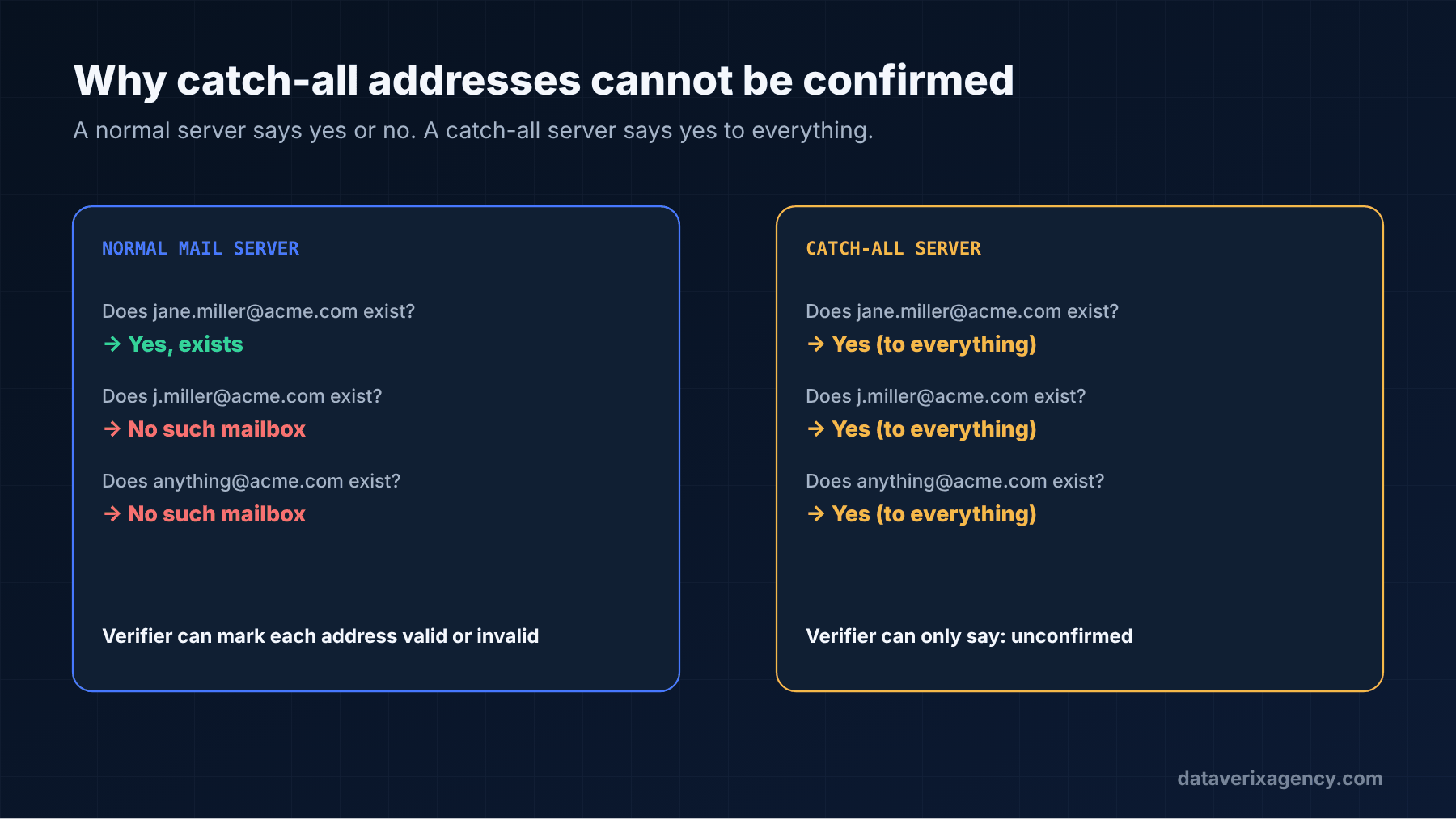
For example, if acme.com uses a catch-all setting, mail sent to jane.miller@acme.com, j.miller@acme.com and anything@acme.com will all be accepted by the server.
Why email verifiers can’t confirm catch-all addresses
Email verification works by asking the receiving mail server, in effect, “would you accept a message for this mailbox?” — without actually sending one. A normal server answers “no” for mailboxes that don’t exist, so the verifier can mark them invalid.
A catch-all server answers “yes” for every address. The verifier has no way to separate the real mailbox from a made-up one, so it returns a status such as catch-all, accept-all or risky. That status means “unconfirmed”, not “invalid”.
Are catch-all emails safe to send to?
They are riskier than verified addresses, for three reasons:
- Some will bounce later. A server may accept a message at first and then bounce it after processing, which still counts against your bounce rate.
- Some go nowhere. Mail sent to non-existent addresses may be delivered to an unmonitored inbox or discarded, so you get no reply and no bounce — just silence.
- Some catch-all domains run strict filtering. Larger organisations often pair catch-all settings with security gateways that filter cold email heavily.
None of this means you should throw catch-all contacts away. At many small and mid-sized businesses, the decision-maker you want sits behind a catch-all domain. The answer is to handle them deliberately.
How to handle catch-all contacts: 5 practical steps
- Segment them. Keep catch-all addresses in their own list so their results don’t hide problems with your verified list.
- Confirm the pattern. If you can find a published address at the same domain — on the website, a press release or a directory — and it follows the same format, your confidence goes up considerably.
- Prioritise by fit. Send only to catch-all contacts who are a strong match for your ideal customer profile.
- Send in small batches. Start with a modest batch, watch bounces and replies, then decide whether to continue.
- Watch your bounce rate closely. If it climbs, pause and review. Our guide to email bounce rates explains what to watch.
How we label catch-all emails
When we deliver contact data, every email carries a status — valid, catch-all, or not found — and catch-all addresses are never counted as “verified”. Where we can confirm the company’s format from a published address, we say so. You decide how to use them with full information. That’s the approach behind our email finding and verification service.
Should your own business use a catch-all inbox?
That’s a separate question. A catch-all on your own domain means you won’t miss mail sent to misspelled addresses, but it also attracts more spam. Many providers, including Google Workspace and Microsoft 365, let administrators route unknown addresses to a chosen mailbox. Weigh convenience against the extra filtering work.
Related: Email list hygiene for B2B senders — how to handle catch-all and risky addresses as part of a full pre-send cleaning routine.
Frequently asked questions
What does catch-all mean in email verification?
It means the domain’s mail server accepts messages for every address, so the verifier cannot confirm whether the specific mailbox exists. The address is unconfirmed rather than invalid.
Is a catch-all email valid?
It may be. Many catch-all addresses belong to real people. The problem is that no verification tool can prove it, so they should be treated as higher-risk than addresses marked valid.
Do catch-all emails bounce?
Sometimes. Some servers accept a message and bounce it later, while others deliver it to an unmonitored inbox. That is why catch-all contacts should be sent in small, monitored batches.
What is the difference between catch-all and invalid?
An invalid address has been confirmed not to exist and should be removed. A catch-all address could not be confirmed either way because the server accepts everything.
Know exactly what you’re sending to
Read our step-by-step guide on how to find a business email address, or request a free data sample to see how clearly labelled, verified contact data looks.
Cover photo: Burst on Unsplash.
Founder of Dataverix. Farrukh specializes in B2B lead generation, decision-maker research and contact data enrichment, helping US businesses turn fragmented information into structured, sales-ready prospect data.
Meet the founder Upwork profile ↗farrukh@dataverixagency.com