CRM Data Cleansing: A 10-Step Checklist for Small Sales Teams
A messy CRM quietly costs you deals: duplicate records, bounced emails, wrong titles and reports nobody trusts. Here is a 10-step checklist to clean it up and keep it clean.
 Farrukh R.Founder, Dataverix · 4 min read

KEY TAKEAWAYS
- CRM data cleansing means finding and fixing duplicate, incomplete, inconsistent and outdated records in your CRM.
- Always back up first, then deduplicate, standardize, verify and update — in that order.
- Cleansing fixes what’s wrong; enrichment adds what’s missing. Do cleansing first.
- A one-off clean-up only lasts if you add simple data entry rules and a regular review.
What is CRM data cleansing?
CRM data cleansing is the process of identifying and correcting duplicate, incomplete, inconsistent or outdated records in a customer relationship management system. The goal is a CRM where every contact is real, every company appears once, and every field means the same thing on every record.
Signs your CRM needs cleaning
- Campaign bounce rates are creeping up.
- The same company appears three times with three spellings.
- Reps keep calling people who left months ago.
- Job title fields contain everything from “CEO” to “ceo / owner” to “Boss”.
- Nobody trusts the pipeline report.
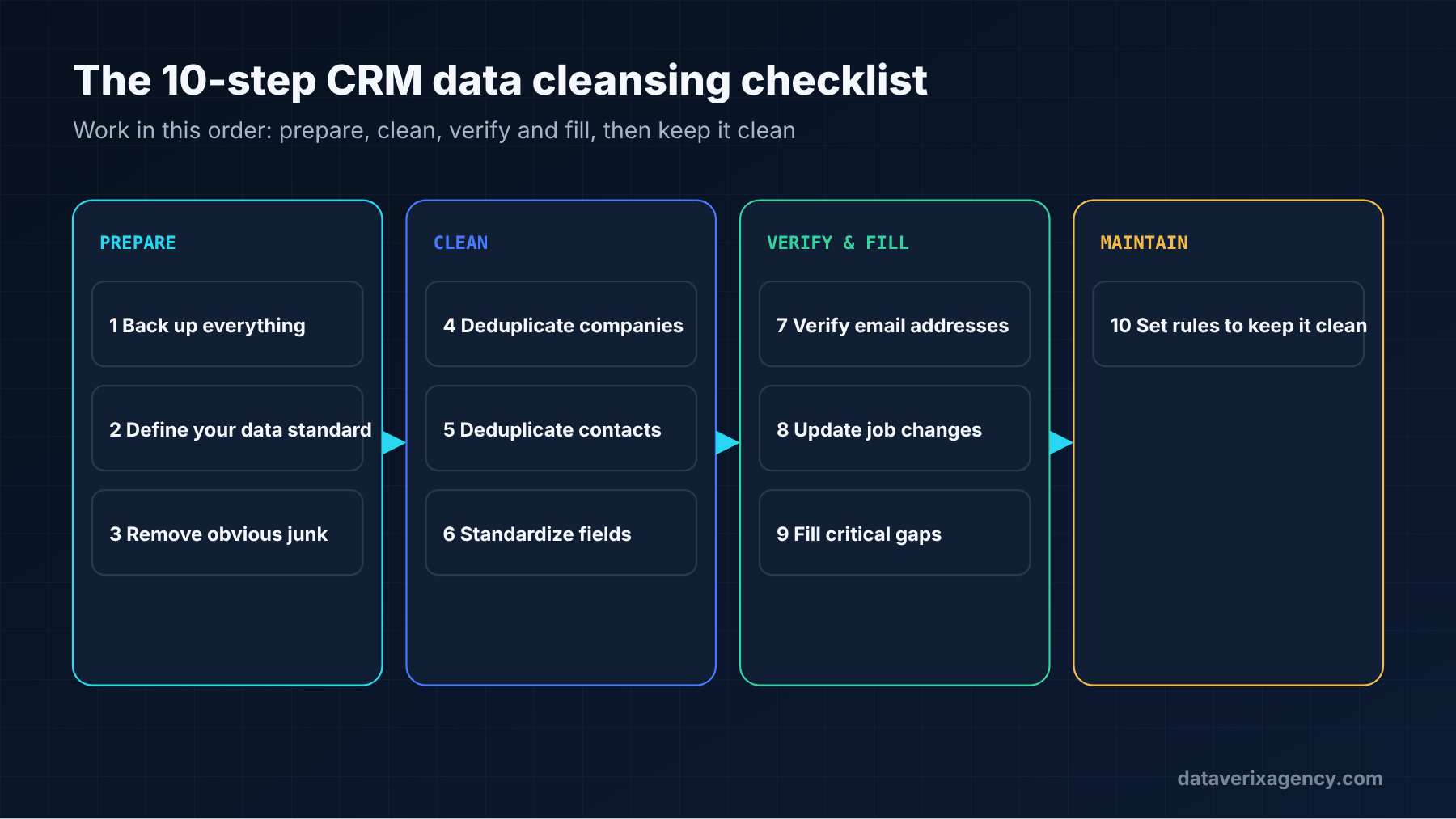
The 10-step CRM data cleansing checklist
1. Back up everything
Export a full copy of your contacts, companies and deals before you change anything. Merges and deletions are hard to undo.
2. Decide what “good” looks like
Write down the required fields, the allowed values for picklists (industry, lifecycle stage, country) and the formats you want for phone numbers, states and URLs. This becomes your data standard.
3. Remove obvious junk
Test records, “asdf” entries, internal staff and spam form submissions. Delete or archive them first so they don’t confuse later steps.
4. Deduplicate companies
Match companies by website domain rather than name — “Acme Inc”, “ACME” and “Acme Industrial Supply” are often the same business at the same domain. Merge carefully, keeping the most complete and most recent values.
5. Deduplicate contacts
Match contacts by email address first, then by name plus company. Watch out for people who have moved between companies — they may legitimately appear twice.
6. Standardize fields
Apply your data standard: consistent state abbreviations, phone formats, country names, title capitalisation and industry categories. Standard fields make segmentation and reporting reliable.
7. Verify email addresses
Run your contact emails through verification and mark each one valid, invalid or catch-all. Remove or flag invalid addresses so they never reach a campaign. Our guide to email bounce rates explains why this matters.
8. Update job changes
For your most important accounts, check whether each contact still holds the same role at the same company. Professional profiles and company team pages are the quickest sources.
9. Fill the critical gaps
Once the data is clean, add the missing fields that matter most — usually job title, company website, industry and company size. That’s data enrichment, and it is far cheaper on a clean file than on a messy one.
10. Set rules to keep it clean
Make key fields required, use picklists instead of free text, block duplicate creation where your CRM allows it, and assign someone to review data quality every quarter.
Should you use a tool or do it manually?
Most CRMs, including HubSpot, Salesforce and Zoho, include basic duplicate management, and there are dedicated cleansing tools. They are good at exact matches and formatting. They are weaker at judgement calls: is this the same company after a rebrand? Is this contact still there? Which of two conflicting titles is right? For those, human review is still the most reliable method — which is why we combine both in our CRM data cleansing service.
How often should you clean your CRM?
A full clean-up once or twice a year works for most small businesses, with a lighter check before every major campaign. If your team imports lists often, review new imports every time before they go live.
Related: California Delete Act and B2B contact data — why a suppression list now matters for any CRM that holds California contacts.
Related: CRM data quality checks to run before using an AI sales agent — AI agents like Salesforce Hunter learn from your CRM, so clean records matter more than ever.
Related: TCPA revocation of consent: the new FCC opt-out rules for B2B teams — clean phone fields and suppression flags make the November 25, 2026 changes easier to handle.
Frequently asked questions
What is the difference between data cleansing and data enrichment?
Data cleansing corrects what is wrong — duplicates, formatting errors and outdated records. Data enrichment adds what is missing, such as job titles, verified emails and company details. Clean first, then enrich.
How long does CRM data cleansing take?
It depends on the number of records and how messy they are. A few thousand records can often be cleaned in days; large CRMs with many integrations take longer. Start with your most active accounts.
Can I clean my CRM without losing data?
Yes, if you back up first and merge rather than delete duplicates. Keep the export until you’ve confirmed the cleaned data is correct.
Which records should I clean first?
Start with active deals and target accounts, then recent leads, then everything else. That way the clean-up pays off for your sales team straight away.
Want a cleaner CRM without the busywork?
Send us an export and we’ll show you what’s duplicated, outdated and missing. Request a free data sample or read about our B2B data enrichment service.
Cover photo: Alex Kotliarskyi on Unsplash.
Founder of Dataverix. Farrukh specializes in B2B lead generation, decision-maker research and contact data enrichment, helping US businesses turn fragmented information into structured, sales-ready prospect data.
Meet the founder Upwork profile ↗farrukh@dataverixagency.com